
How Android Smartphone Cooling Systems Affect Sustained Performance
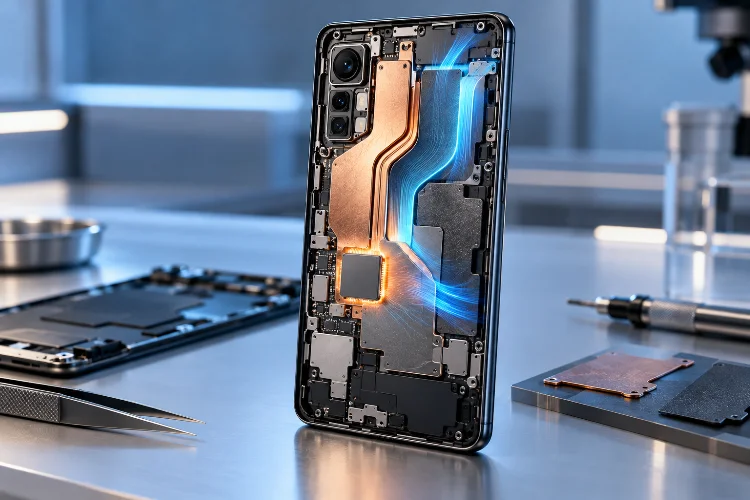
A modern Android flagship can be ridiculously fast for the first few minutes. Launch a demanding game, export a video, or run a benchmark, and the latest Snapdragon or MediaTek chip may deliver desktop-like performance from something that fits in your pocket.
But keeping that speed is a completely different challenge.
Powerful smartphone processors generate heat, and there is only so much heat a thin phone can handle before the system starts reducing CPU and GPU speeds.
This behavior, known as thermal throttling, explains why two phones with the same processor can perform very differently during a 30-minute gaming session.
That is where Android smartphone cooling systems become important. Manufacturers now use vapor chambers, graphite sheets, thermal interface materials, heat spreaders, and even active fans to control temperatures.
Cooling is not simply about making a phone comfortable to hold. It directly affects sustained performance, frame-rate stability, power consumption, and sometimes battery longevity.
Understanding how these systems work can make smartphone specifications much easier to judge.
Why Smartphones Lose Performance When They Get Hot
Every processor produces heat while performing calculations. The harder the CPU, GPU, and AI processors work, the more electrical power they consume and the more heat they generate.
Unlike desktop PCs, smartphones cannot rely on huge heatsinks and multiple fans. Their components are packed into extremely thin bodies alongside batteries, cameras, antennas, and displays.
Once internal temperatures reach limits set by the manufacturer, Android’s thermal management system begins reducing performance.
Qualcomm explains that excessive power consumption during gaming can create enough heat to trigger thermal throttling, leading to lag and degraded gameplay. The goal is therefore not simply maximum performance, but sustainable performance over longer sessions.
This is why a phone that scores extremely high during one benchmark run may perform differently after several consecutive tests.
Peak Performance vs. Sustained Performance
Peak performance shows what the processor can achieve for a short period.
Sustained performance tells you how much of that speed remains after the device has been working hard for several minutes.
For gamers and content creators, the second number is usually more useful.
Vapor Chambers Spread Heat Across a Larger Area
Vapor chamber cooling has become common in flagship and gaming Android phones.
A vapor chamber is essentially a thin, sealed metal chamber containing a small amount of liquid. When part of the chamber becomes hot, the liquid evaporates and moves toward cooler areas. It then condenses, transferring heat away from the processor.
The process repeats continuously.
Instead of allowing heat to remain concentrated around the system-on-chip, a vapor chamber spreads it across a much larger surface area where it can be dissipated.
Size can matter, although design quality is equally important. Samsung, for example, said the Galaxy S25 series introduced an approximately 40% larger vapor chamber together with a customized thermal interface material to improve heat management during intensive workloads.
A larger chamber gives engineers more surface area to distribute heat before hotspots become severe.
Graphite, Thermal Materials, and Heat Spreaders Matter Too
A vapor chamber is rarely working alone.
Modern phones typically use several layers of thermal materials between the processor and exterior surfaces. Graphite sheets are especially popular because they can spread heat across relatively large areas while remaining extremely thin.
Thermal interface materials also fill tiny gaps between components. Without them, microscopic pockets of air can reduce heat transfer.
ASUS provides a good example with its ROG Phone cooling designs. The ROG Phone 8 combines a vapor chamber, graphite sheets, boron nitride material, and a dedicated heat conductor around the processor.
ASUS claims its 360-degree SoC Cooling System Gen 2 improved thermal efficiency by 22% compared with the previous design.
The important point is that cooling is a complete system.
Simply advertising a giant vapor chamber does not automatically guarantee better sustained performance if heat cannot move effeciently through the rest of the device.
Bigger Cooling Systems Do Not Automatically Prevent Throttling
This is where smartphone marketing can become misleading.
A manufacturer may advertise thousands of square millimeters of cooling area, but real-world performance still depends on processor efficiency, software limits, ambient temperature, and chassis design.
The Poco F6 Pro provides an interesting example. Xiaomi promoted a large LiquidCool vapor chamber, yet Notebookcheck measured surface temperatures reaching roughly 44.8°C under extreme load and observed significant benchmark throttling.
That does not mean the cooling system failed.
Thermal throttling is actually a safety mechanism. Manufacturers intentionally reduce processor speed to prevent uncomfortable surface temperatures, excessive battery stress, or internal component damage.
A powerful cooling system simply allows the device to operate at higher performance levels for longer before those limits are reached.
This difference is important when comparing phones with identical processors.
Gaming Phones Take Cooling Much Further
Gaming-focused smartphones often have an advantage because their designs prioritize sustained performance more heavily than thinness or minimalist styling.
ASUS ROG phones, for example, combine internal vapor chambers with optional external coolers. The ROG Phone 7 Ultimate uses graphite, boron nitride thermal material, a vapor chamber, and an AeroActive Cooler containing both a fan and thermoelectric cooling element.
Active cooling physically moves heat away from the phone instead of relying entirely on passive conduction.
That can make a substantial difference during long gaming sessions.
Even newer cooling experiments are becoming more aggressive. The REDMAGIC and other gaming-oriented phones use internal fans, while some devices are experimenting with more advanced liquid-cooling approaches.
Still, active cooling is not magic. Android Authority found that even a fan-assisted REDMAGIC 11S Pro could experience performance throttling during an intensive gaming test in hot weather, with the handset reaching around 41°C.
Ambient temprature therefore remains a major factor.
Cooling Design Can Change How Two Identical Chips Perform
Imagine two phones using the same flagship processor.
Phone A allows the chip to run aggressively at maximum frequencies but has limited cooling. Phone B uses slightly more conservative tuning paired with a larger vapor chamber and better heat distribution.
During the first two minutes, Phone A may win a benchmark.
Twenty minutes later, the situation might reverse. Phone A could reduce its GPU clocks significantly, while Phone B continues running at a more consistant speed.
This is why chipset comparisons alone do not tell the full story.
OnePlus illustrates how complex modern cooling has become. The OnePlus 15 uses what the company calls a 360° Cryo-Velocity Cooling System, including aerogel insulation, graphite layers, and a 5,731 mm² 3D vapor chamber.
Yet independent testing has shown that powerful processors can still encounter thermal limits depending on workload and tuning.
Hardware and software thermal management must work together.
What Cooling Means for Real-World Android Performance
Most users will rarely notice thermal throttling while messaging, browsing, or watching videos.
Heavy workloads are different.
Games with high frame-rate modes can push the GPU continuously. Video recording, especially at high resolutions, can load the processor and image signal processor for extended periods.
Video editing, emulation, AI processing, and navigation combined with charging can also generate considerable heat.
Charging while gaming is particularly demanding because both the processor and battery may produce heat simultaneously.
For these workloads, good thermal design can mean steadier frame rates, fewer sudden slowdowns, and a more comfortable device.
External conditions also matter. Playing the same game in a cool room and outdoors in tropical weather can produce noticeably different results.
So when reading phone reviews, look beyond one AnTuTu or Geekbench score. Stress tests, repeated benchmark loops, gaming FPS graphs, and temperature measurements provide a much better picture of long-term performance.
Android smartphone cooling systems have become a major part of modern performance engineering. Powerful chips can deliver impressive benchmark numbers, but they cannot maintain those speeds indefinitely without effective heat management.
Vapor chambers, graphite sheets, thermal interface materials, heat spreaders, and active cooling all help move heat away from critical components.
Better thermal design can delay throttling and keep CPU and GPU performance more stable during gaming, video editing, and other demanding workloads.
However, bigger cooling hardware does not automatically guarantee better results. Software tuning, processor efficiency, ambient temperature, and device design matter just as much.
When choosing your next performance-focused Android phone, do not look at the chipset alone. Check sustained benchmark results and thermal tests too. They reveal how fast the phone remains after the excitement of the first five minutes disappears.