Android Smartphone Thermal Throttling Under Heavy Loads Explained

Your Android phone may feel incredibly fast when you launch a game, run a benchmark, or start editing a video.
Give it twenty minutes, though, and things can change. Frame rates may drop, animations can become less smooth, and the device may suddenly feel slower than it did at the beginning.
That slowdown is often caused by thermal throttling.
Android smartphone thermal throttling is a protective mechanism that reduces the performance of components such as the CPU and GPU when temperatures rise beyond certain limits.
It is not necessarily a defect. In fact, throttling helps protect the battery, processor, display, and other internal components from excessive heat.
The interesting part is that not every Android phone throttles in the same way. Two devices using the same Snapdragon or MediaTek processor can deliver very different sustained performance because their cooling systems, software tuning, chassis designs, and power limits are different.
Understanding how throttling works can therefore tell you much more about real smartphone performance than a single benchmark score.
What Exactly Is Thermal Throttling?
Modern smartphone processors can dynamically adjust their clock speeds and power consumption depending on workload.
When you perform a simple task such as reading messages, the processor does not need maximum power. Start a demanding 3D game, however, and both the CPU and GPU may operate much closer to their performance limits.
Higher performance usually means higher power consumption, which creates more heat.
Android continuously monitors the thermal condition of the device. The Android Open Source Project defines several thermal severity levels ranging from no throttling to light, moderate, severe, critical, emergency, and eventually shutdown.
At the severe stage, Android notes that thermal mitigation can significantly limit system capacity and may produce effects such as display jank or audio jitter.
Rather than allowing temperatue to increase indefinitely, the system starts restricting performance.
Throttling Is a Safety Feature
It can be frustrating when performance drops, but removing thermal limits entirely would usually make things worse.
Without proper protection, excessive heat could create uncomfortable surface temperatures, accelerate battery degradation, or affect internal hardware reliability.
The goal is therefore not zero throttling. The goal is maintaining the highest practical performance while keeping temperatures under control.
Why Heavy Workloads Trigger Throttling
Gaming is probably the easiest way to see thermal throttling because modern games can continuously stress both CPU and GPU resources.
High frame rates make the problem even harder. Running a game at 120fps requires the device to prepare roughly twice as many frames as 60fps, assuming similar rendering complexity.
Qualcomm explains that intensive CPU and GPU workloads can increase power consumption and eventually trigger thermal throttling, causing lower performance and degraded gameplay. The company recommends testing games under continuous load rather than relying only on short benchmarks.
Gaming is not the only trigger.
Recording high-resolution video, editing footage, using emulators, processing AI workloads, navigating with GPS under direct sunlight, or performing demanding tasks while fast charging can all increase internal heat.
Combining several activities makes the thermal challenge even greater.
Peak Performance and Sustained Performance Are Different
This is one of the most important concepts when comparing smartphones.
Peak performance tells you how fast a phone can run for a short period. Sustained performance tells you how much of that speed remains after extended stress.
Imagine Phone A starts a benchmark with a score of 2,000 but falls to 1,200 after fifteen minutes. Phone B starts at only 1,850 but remains around 1,650.
Phone A wins the first benchmark screenshot. Phone B may provide the better gaming experience.
That is why repeated benchmark loops and stress tests are useful. They expose the performance curve instead of showing only the best result.
Qualcomm recommends profiling at least 10 minutes of continuous gameplay to reveal thermal behavior that short synthetic tests may miss.
For serious gaming, sustained speed is usually much more valuable than an impressive five-minute benchmark.
What Happens Inside Android When the Phone Gets Hot?
Android does not simply wait until a phone becomes dangerously hot and then cut performance in half.
Modern Android devices can react progressively.
Android’s thermal framework allows the operating system and applications to monitor changing thermal conditions. Android’s PowerManager API even exposes thermal headroom information that estimates how close a device is to severe throttling.
A thermal headroom value of 1.0 represents the severe-throttling threshold, where restrictions can affect the CPU, GPU, and other subsystems.
This gives applications an opportunity to adapt before performance collapses.
A game could reduce rendering resolution, lower visual effects, decrease frame rate, or reduce other workloads when thermal pressure rises.
Google’s Android game-development documentation specifically recommends reducing workloads when available thermal headroom indicates that severe throttling is approaching.
Smart performance management is therefore increasingly about avoiding sudden performance cliffs rather than simply chasing maximum clock speeds.
Why Two Phones With the Same Processor Throttle Differently
The chipset name only tells part of the story.
Manufacturers choose their own cooling solutions, thermal limits, power profiles, battery layouts, chassis materials, and software tuning. These differences can significantly change how long a processor maintains its highest speeds.
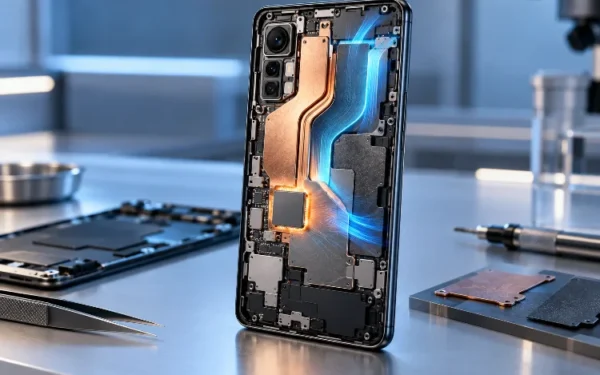
One phone might use a large vapor chamber with extensive graphite layers. Another may have a smaller cooling system because its design prioritizes thinness or camera hardware.
Manufacturers can also choose different thermal strategies.
An aggressive phone may allow higher temperatures in exchange for faster sustained performance. A conservative model might reduce clock speeds earlier to maintain cooler surface temperatures and better battery effeciency.
Neither strategy is automatically wrong.
The important question is which approach fits your usage. A competitive mobile gamer may prefer aggressive cooling and sustained GPU performance, while an everyday user may prefer lower temperatures and longer battery life.
Gaming Shows Thermal Throttling Most Clearly
Long gaming sessions provide one of the best real-world examples of sustained thermal load.
In testing involving flagship Snapdragon devices, Android Authority observed sustained frame-rate reductions once test phones reached around 40°C during Call of Duty Mobile. Reaching that temperature required roughly 20–30 minutes of repeated gameplay in the test conditions.
That example shows why a five-minute gaming test can be misleading.
A device may deliver nearly perfect frame rates at first and become less consistant after heat has accumulated inside the chassis.
The game itself also matters. Some titles place heavier demand on the GPU, while others are limited by CPU performance or simply have frame-rate caps.
Resolution, graphics settings, screen brightness, network activity, and ambient temperature all affect the final result.
Even the case on your phone can influence how quickly heat escapes.
Cooling Hardware Can Delay the Performance Drop
Manufacturers use increasingly sophisticated cooling systems to extend sustained performance.
Vapor chambers spread heat away from the processor across a larger area. Graphite sheets help transfer that energy throughout the chassis, while thermal interface materials improve contact between heat-generating components and cooling structures.
Gaming phones may go further with internal fans or external cooling accessories.
Better cooling does not necessarily prevent throttling forever. Instead, it increases thermal headroom, allowing the processor to operate at higher frequencies for longer.
Software optimization can achieve something similar.
Qualcomm notes that reducing rendering resolution, unnecessary GPU workloads, shader complexity, and power consumption can improve thermal behavior.
More recent techniques such as AI-assisted super resolution and frame generation can also reduce the amount of native GPU rendering required, potentially helping maintain sustained clocks during longer sessions.
In other words, performance optimization is not always about making hardware work harder. Sometimes the smartest solution is making it do less work.
How to Reduce Thermal Throttling in Daily Use
You cannot completely eliminate thermal throttling without changing the physical limits of the phone, but you can reduce unnecessary heat.
Avoid gaming under direct sunlight when possible, especially while charging. High ambient temperatures give the cooling system less room to dissipate heat.
Reducing graphics settings from maximum to high can also produce surprisingly small visual differences while significantly reducing GPU load.
A 60fps target may remain smoother over a long session than an unstable 120fps mode that repeatedly throttles.
Removing a thick protective case can sometimes help during demanding workloads, although the difference varies by phone design.
Most importantly, do not judge performance based entirely on one AnTuTu, Geekbench, or 3DMark result. Look for repeated stress tests, frame-time graphs, temperature measurements, and long gaming sessions.
Those tests reveal how the phone behaves after the processor has been working hard for more than a few minutes.
Android smartphone thermal throttling is a normal part of modern mobile performance management.
Powerful processors generate significant heat under heavy loads, and Android reduces CPU, GPU, and other system activity when temperatures begin approaching unsafe levels.
The important difference between phones is how quickly that happens and how much performance remains afterward. Cooling hardware, processor efficiency, software tuning, ambient temperature, charging, and workload can all influence sustained speed.
For everyday users, occasional throttling may barely be noticeable. For gamers, video creators, and power users, it can completely change the experience.
Before buying a performance-focused Android phone, look beyond peak benchmark scores. Check stress tests and long-term gaming results instead. The fastest phone is often the one that stays fast after twenty minutes – not the one that wins the first benchmark run.